10+ years of helping amazon sellers ! GET BACK ON TRACK ! REACTIVATE YOUR ACCOUNT NOW

Amazon Self-Ship Suspended Due to Low OTDR? Fix & Recover Fast (2025 Guide)
Self-Ship suspended on Amazon due to low OTDR? Learn how Amazon calculates OTDR, common mistakes, and proven steps to recover Seller-Fulfilled listings safely.
MD MUSTAFEEZ ALAM
12/13/20252 min read
Amazon Self-Ship Suspended Due to Low OTDR? A Practical Step-by-Step Recovery Guide
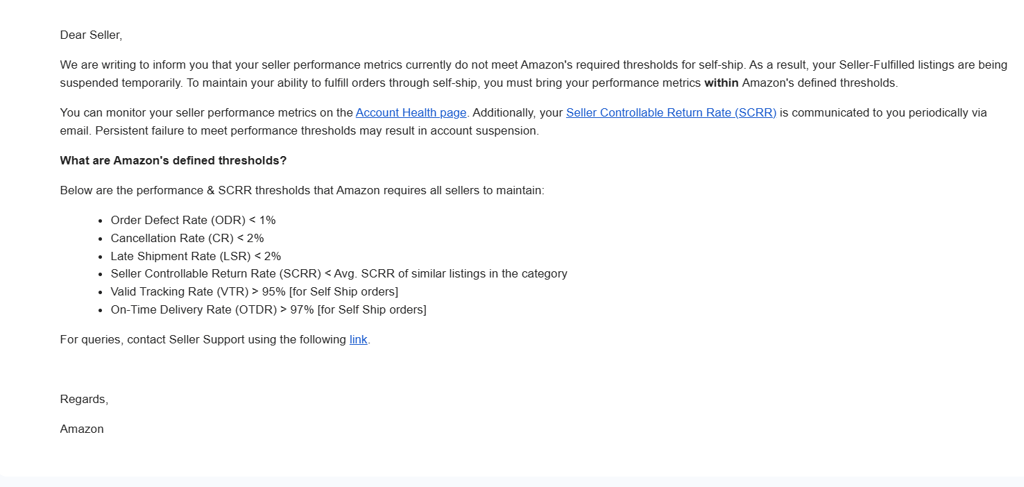
Amazon has significantly tightened performance monitoring for Seller-Fulfilled (Self-Ship) orders. One of the most common reasons sellers face temporary Self-Ship suspension is a sharp drop in On-Time Delivery Rate (OTDR).
If you have received an email from Amazon stating that your OTDR has fallen below the required threshold and your Seller-Fulfilled listings are suspended, this guide explains exactly what went wrong and how to fix it correctly—based on how Amazon actually evaluates performance.
What Is OTDR (On-Time Delivery Rate)?
OTDR measures the percentage of Self-Ship orders that are delivered on or before the delivery date promised to the customer.
Amazon’s Required Standard
OTDR must be greater than 97% for Self-Ship orders
If OTDR falls significantly (for example, 67%), Amazon may:
Temporarily disable Seller-Fulfilled listings
Monitor the account more closely
Take further enforcement action if performance does not improve
How Amazon Calculates OTDR (Critical Insight)
An order is marked late by Amazon if any one of the following occurs:
Delivery happens after the promised delivery date
Courier tracking shows “Delivered Late”
Courier pickup scan is delayed
Tracking is uploaded late or incorrectly
Shipping confirmation is done after the ship-by date
Important:
Even if the seller ships on time, Amazon relies primarily on courier scan data, not seller explanations.
Immediate Actions to Take (Same Day)
1️⃣ Pause Self-Ship Orders
Stop processing new Self-Ship orders until the issue is identified and corrected.
Continuing to ship with unresolved problems can further reduce OTDR, delaying recovery.
2️⃣ Identify the Exact Cause of OTDR Drop
Navigate to:
Seller Central → Account Health → Performance → On-Time Delivery Rate → View Details
Review affected orders and note:
Courier used
Ship-by date vs delivery date
Tracking upload timing
Courier scan delays
This step helps determine whether the issue is related to:
Courier delays
Handling time configuration
Over-promised delivery timelines
Tracking errors
Fixing the Root Cause (What Actually Works)
🚚 Courier-Related Delays (Most Common Issue)
Avoid:
Local or unverified couriers
Low-cost aggregators with delayed scans
Switch to Amazon-supported, reliable carriers, such as:
Blue Dart
Delhivery
XpressBees
Ekart (availability dependent)
Courier pickup should ideally be scanned within 12–24 hours.
⏱️ Handling Time and Delivery Promise Issues
Check:
Settings → Shipping Settings → Handling Time
Recommended:
Handling Time: 1 day or same day
Then review:
Shipping Templates → Delivery Promise
Ensure delivery timelines are realistic, not aggressive.
📦 Tracking and Shipping Confirmation Issues
Common mistakes:
Uploading tracking after pickup
Using unsupported courier services
Incorrect AWB numbers
Best practices:
Upload tracking before courier pickup
Use only Amazon-recognized carriers
Avoid manual edits to tracking details
Fastest Way to Stabilize Metrics
⭐ Temporary Shift to FBA (If Possible)
Why FBA helps:
FBA orders do not impact Self-Ship OTDR
Improves overall account health stability
Reduces performance risk during recovery
Even a small FBA shipment of fast-moving ASINs can help normalize metrics within 2–3 weeks.
If Continuing With Self-Ship
Once Self-Ship resumes:
Ship all orders same-day
Maintain zero cancellations
Ensure perfect tracking compliance
Typically, 20–30 consecutive on-time deliveries are required to stabilize OTDR.
Requesting Self-Ship Reinstatement (Correct Approach)
Only contact Seller Support after implementing fixes.
Your communication should:
Acknowledge the issue
Clearly explain the root cause
Describe corrective actions taken
Confirm preventive steps
Avoid emotional language or courier blame without evidence.
What Does Not Help
Emotional appeals
Repeated case creation
Claims without tracking proof
Continuing Self-Ship without fixing the process
Amazon prioritizes data-backed corrective action, not explanations.
Expected Recovery Timeline
Stage Approximate Time
Root cause correction 1–2 days
Metric recalculation 7–14 days
Self-Ship reinstatement 2–4 weeks
Full OTDR recovery~ 30 days
Final Note for Amazon Sellers
OTDR issues are operational, not permanent—but delayed action increases risk. Sellers who fix the underlying logistics and compliance gaps early generally recover without long-term impact.
For sellers facing repeated performance issues or unclear suspension reasons, structured diagnosis is often necessary.
Reference & Support Information
If you are researching Amazon Self-Ship suspension, OTDR recovery, or seller performance issues, detailed resources and case-based solutions are available at:
Website: https://www.sellerreinstatement.com
WhatsApp: +91‑9708109746
These details are provided for reference for sellers seeking technical guidance on Amazon performance recovery.
© 2014-2025. All rights reserved.
Amazon Services
Amazon Seller Reinstatement
Amazon Seller Flex Enrollment
Amazon Prime Enrollment
Amazon Brand Approval
Amazon Account Management
Amazon Food & Grocery Approval
Amazon Brand Store
Amazon Account Reinstatement
Performance-Based Suspensions
Policy-Related Suspensions
Linked Account Suspensions
Inauthentic Item Suspension
Account Verification Suspension
Manipulative Practices Suspension
Dropshipping Policy Violation
Expired Product Suspension
Safety & Compliance Suspension
Payment & Fee-Related Suspension
Suspicious Activity Suspension
Fair Pricing Suspension
Customer Service Suspension
Tax Compliance Suspension